Showing posts with label arp. Show all posts

Saturday, April 23, 2011

The Problem of Router-on-a-Stick Configuration on Ethernet Interface

RT1 with router-on-a-stick configuration on an Ethernet interface was unable to communicate with PC1 resides in Native VLAN due to confusion of using the main interface and subinterface.
Note: This problem does not happen on Fast Ethernet interfaces.

Below shows the configuration on RT1 which experienced the above describe problem scenario:
!
interface Ethernet0/0
 no ip address
 full-duplex
!
interface Ethernet0/0.1
 encapsulation dot1Q 1 native
 ip address 192.168.1.1 255.255.255.0
!
interface Ethernet0/0.2
 encapsulation dot1Q 2
 ip address 192.168.2.1 255.255.255.0
!
interface Ethernet0/0.3
 encapsulation dot1Q 3
 ip address 192.168.3.1 255.255.255.0
!

Below shows the root cause of the problem – RT1 unable to communicate with PC1:
RT1#debug arp
ARP packet debugging is on
RT1#
RT1#ping 192.168.1.2 rep 1

Type escape sequence to abort.
Sending 1, 100-byte ICMP Echos to 192.168.1.2, timeout is 2 seconds:
.
Success rate is 0 percent (0/1)
RT1#
RT1#sh arp
Protocol  Address          Age (min)  Hardware Addr   Type   Interface
Internet  192.168.1.1             -   cc01.01c4.0000  ARPA   Ethernet0/0.1
Internet  192.168.1.2             0   Incomplete      ARPA
RT1#
RT1#sh log | in ARP
00:07:31: IP ARP: sent req src 192.168.1.1 cc01.01c4.0000,
00:07:31: IP ARP rep filtered src 192.168.1.2 cc02.01c4.0000, dst 192.168.1.1 cc01.01c4.0000 wrong cable, interface Ethernet0/0
RT1#

Below shows the output of the show arp command after implemented a workaround – configure the native VLAN IP address on the main interface instead of the subinterface:
RT1#sh arp
Protocol  Address          Age (min)  Hardware Addr   Type   Interface
Internet  192.168.1.1             -   cc01.01c4.0000  ARPA   Ethernet0/0
Internet  192.168.1.2             0   cc02.01c4.0000  ARPA   Ethernet0/0

Monday, April 18, 2011

Local Proxy ARP

Below shows the output of the show ip interface {intf-type intf-num} command which shows that local proxy ARP is disabled. This section discusses what Local Proxy ARP is and its usage.
Router#sh ip int fa1/0
FastEthernet1/0 is up, line protocol is up
  Internet address is 10.10.10.1/24
  Broadcast address is 255.255.255.255
  Address determined by setup command
  MTU is 1500 bytes
  Helper address is not set
  Directed broadcast forwarding is disabled
  Outgoing access list is not set
  Inbound  access list is not set
  Proxy ARP is enabled
  Local Proxy ARP is disabled
--- output omitted ---

Local Proxy ARP is used when there is a need to perform proxy ARP for hosts in local network. Normally network devices do not perform local proxy ARP as they would assume the host with the requested IP address would answer the ARP request itself.

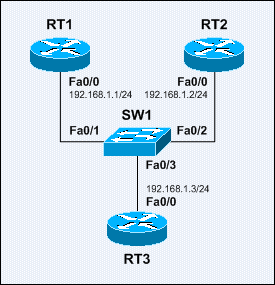
Sample Local Proxy ARP Network

The switchport protected interface subcommand is configured on SW1 Fa0/1 and Fa0/2.
The ip local-proxy-arp interface subcommand is configured on RT3 Fa0/0.

Below shows that RT3 is performing proxy ARP for RT2:
RT1#ping 192.168.1.2
Type escape sequence to abort.
Sending 5, 100-byte ICMP Echos to 17.0.0.2, timeout is 2 seconds:
!!!!!
Success rate is 100 percent (5/5), round-trip min/avg/max = 1/3/4 ms
RT1#sh arp
Protocol  Address          Age (min)  Hardware Addr   Type   Interface
Internet  192.168.1.1             -   1111.1111.1111  ARPA   FastEthernet0/0
Internet  192.168.1.2             6   3333.3333.3333  ARPA   FastEthernet0/0
Internet  192.168.1.3             5   3333.3333.3333  ARPA   FastEthernet0/0

The switchport protected interface subcommand configures a switch port as a protected port. Protected ports have the following characteristics:
1) A protected port does not forward any traffic (including unicast, multicast, and broadcast) to other protected ports – traffic cannot be forwarded between protected ports at Layer 2; all traffic between protected ports must be forwarded through a Layer 3 device.
2) Traffic between a protected port and a non-protected port is forwarded as usual.
Note: This feature applies upon a single switch, and cannot be extended across multiple switches.

Protected ports are being used in environments where traffic must not be forwarded between ports on the same switch so that an end system does not see the traffic from another end system. Below are some other sample usages of protected ports:
1) A hotel environment where the ports for each room should not be able to communicate with each other, but they need to communicate with the gateway.
2) A DMZ zone where the ports for each server should not be able to communicate with each other in order to prevent further damages of other servers when a server is owned.
3) A collocation environment where servers from different customers should not be able to communicate with each other.

Dive into Proxy ARP

Proxy ARP allows a host with not routing capability to reach remote subnets without the default gateway configuration. The hosts assume the network they reside as a flat network in which they can reach any hosts after the ARP resolution process. Proxy ARP is defined in RFC 1027.

Below are some of the disadvantages of using Proxy ARP:
1) It increases the amount of ARP traffic on the network.
2) A host requires larger ARP table for handling IP-to-MAC address mappings.
3) Security threat – spoofing, where a host claims to be another for intercepting packets.

Sample Proxy ARP Network

Below shows the ARP table on PC1 when RT1 providing Proxy ARP service and PC1 is not configured with any default gateway:
PC1#sh arp
Protocol  Address          Age (min)  Hardware Addr   Type   Interface
Internet  10.10.10.10             -   cc00.0f28.0000  ARPA   FastEthernet0/0
Internet  10.10.10.1              0   cc01.0f28.0000  ARPA   FastEthernet0/0
Internet  192.168.1.10            0   cc01.0f28.0000  ARPA   FastEthernet0/0
Internet  172.16.1.2              0   cc01.0f28.0000  ARPA   FastEthernet0/0
PC1#
RT1#sh ip redirects
Default gateway is not set

Host               Gateway           Last Use    Total Uses  Interface
ICMP redirect cache is empty
RT1#

Sunday, March 27, 2011

Gratuitous ARP


The figure above demonstrates the use of gratuitous ARP.
When RT2 brings up its Fa0/0 interface with no shutdown interface subcommand, it would send out multiple gratuitous ARP replies to detect duplicate address before using the assigned IP address.

Below shows the operation of gratuitous ARP with the ARP debug messages on RT1 and RT2:
RT2(config-if)#no shut
RT2(config-if)#
00:04:24.035: IP ARP: sent rep src 10.10.10.1 2222.2222.2222,
                 dst 10.10.10.1 ffff.ffff.ffff FastEthernet0/0
00:04:24.039: IP ARP: sent rep src 10.10.10.1 2222.2222.2222,
                 dst 10.10.10.1 ffff.ffff.ffff FastEthernet0/0
00:04:26.011: %LINK-3-UPDOWN: Interface FastEthernet0/0, changed state to up
00:04:27.011: %LINEPROTO-5-UPDOWN: Line protocol on Interface FastEthernet0/0, changed state to up
RT2(config-if)#
---------------------------------------------------------------------
RT1#
00:04:24.575: IP ARP: rcvd rep src 10.10.10.1 2222.2222.2222, dst 10.10.10.1 FastEthernet0/0
00:04:24.579: %IP-4-DUPADDR: Duplicate address 10.10.10.1 on FastEthernet0/0, sourced by 2222.2222.2222
00:04:24.583: IP ARP: sent rep src 10.10.10.1 1111.1111.1111,
                 dst 10.10.10.1 1111.1111.1111 FastEthernet0/0
00:04:24.587: IP ARP: rcvd rep src 10.10.10.1 2222.2222.2222, dst 10.10.10.1 FastEthernet0/0
00:04:24.587: IP ARP: Gratuitous ARP throttled.
00:04:24.591: IP ARP: 10.10.10.1 added to arp_defense_Q
00:04:25.139: IP ARP: 10.10.10.1 removed from arp_defense_Q
00:04:25.139: IP ARP: sent rep src 10.10.10.1 1111.1111.1111,
                 dst 10.10.10.1 1111.1111.1111 FastEthernet0/0
RT1#

Download the packets captured on RT1 FastEthernet0/0 here.