Showing posts with label rip. Show all posts

Friday, March 30, 2012

Disabling RIP Split Horizon

From Cisco Press - Troubleshooting IP Routing Protocols:

Split horizon is a technique used to avoid routing loops.
With split horizon, when a route is learned on an interface, that route is not advertised back out on the same interface.
For example, RT2 receives an update about Network X with a metric of 1 from the neighboring RT1.
RT2 will not advertise Network X back to RT1 if split horizon is enabled.
If split horizon is disabled, however, RT2 will advertise Network X with a metric of 2 to RT1.
If Network X fails, RT1 will think that RT2 has a better way to get to X, so it will send the packet destined to Network X toward RT1, creating a black hole.

RT1#sh cdp neighbors
Capability Codes: R - Router, T - Trans Bridge, B - Source Route Bridge
                  S - Switch, H - Host, I - IGMP, r - Repeater

Device ID        Local Intrfce     Holdtme    Capability  Platform  Port ID
RT2              Ser 0/0            153          R        3620      Ser 0/0
RT1#
RT1#sh ip int brief
Interface                  IP-Address      OK? Method Status                Protocol
Serial0/0                  192.168.2.1     YES manual up                    up
FastEthernet1/0            192.168.1.1     YES manual up                    up
RT1#
RT1#debug ip rip
RIP protocol debugging is on
RT1#
RT1#conf t
Enter configuration commands, one per line.  End with CNTL/Z.
RT1(config)#router rip
RT1(config-router)#network 192.168.1.0
RT1(config-router)#network 192.168.2.0
RT1(config-router)#exit
RT1(config)#end
RT1#
RT1#sh ip route

Gateway of last resort is not set

C    192.168.1.0/24 is directly connected, FastEthernet1/0
C    192.168.2.0/24 is directly connected, Serial0/0
RT1#
00:02:16: RIP: sending v1 update to 255.255.255.255 via Serial0/0 (192.168.2.1)
00:02:16: RIP: build update entries
00:02:16:       network 192.168.1.0 metric 1
00:02:16: RIP: sending v1 update to 255.255.255.255 via FastEthernet1/0 (192.168.1.1)
00:02:16: RIP: build update entries
00:02:16:       network 192.168.2.0 metric 1
00:02:46: RIP: sending v1 update to 255.255.255.255 via Serial0/0 (192.168.2.1)
00:02:46: RIP: build update entries
00:02:46:       network 192.168.1.0 metric 1
00:02:46: RIP: sending v1 update to 255.255.255.255 via FastEthernet1/0 (192.168.1.1)
00:02:46: RIP: build update entries
00:02:46:       network 192.168.2.0 metric 1
RT1#
================================================================================
RT2#sh ip int brief
Interface                  IP-Address      OK? Method Status                Protocol
Serial0/0                  192.168.2.2     YES manual up                    up
RT2#
RT2#debug ip rip
RIP protocol debugging is on
RT2#
RT2#conf t
Enter configuration commands, one per line.  End with CNTL/Z.
RT2(config)#router rip
RT2(config-router)#network 192.168.2.0
RT2(config-router)#exit
RT2(config)#end
RT2#
00:02:15: RIP: received v1 update from 192.168.2.1 on Serial0/0
00:02:15:      192.168.1.0 in 1 hops
00:02:24: RIP: sending v1 update to 255.255.255.255 via Serial0/0 (192.168.2.2)
00:02:24: RIP: build update entries - suppressing null update
00:02:45: RIP: received v1 update from 192.168.2.1 on Serial0/0
00:02:45:      192.168.1.0 in 1 hops
00:02:53: RIP: sending v1 update to 255.255.255.255 via Serial0/0 (192.168.2.2)
00:02:53: RIP: build update entries - suppressing null update/0
RT2#
RT2#conf t
Enter configuration commands, one per line.  End with CNTL/Z.
RT2(config)#int s0/0
RT2(config-if)#no ip split-horizon ?
  eigrp  Enhanced Interior Gateway Routing Protocol (EIGRP)
  <cr>

RT2(config-if)#no ip split-horizon
RT2(config-if)#end
RT2#
00:03:14: RIP: received v1 update from 192.168.2.1 on Serial0/0
00:03:14:      192.168.1.0 in 1 hops
00:03:20: RIP: sending v1 update to 255.255.255.255 via Serial0/0 (192.168.2.2)
00:03:20: RIP: build update entries
00:03:20:       network 192.168.1.0 metric 2
00:03:20:       subnet 192.168.2.0 metric 1
RT2#
================================================================================
RT1#
00:03:16: RIP: sending v1 update to 255.255.255.255 via Serial0/0 (192.168.2.1)
00:03:16: RIP: build update entries
00:03:16:       network 192.168.1.0 metric 1
00:03:16: RIP: sending v1 update to 255.255.255.255 via FastEthernet1/0 (192.168.1.1)
00:03:16: RIP: build update entries
00:03:16:       network 192.168.2.0 metric 1
00:03:22: RIP: received v1 update from 192.168.2.2 on Serial0/0
00:03:22:      192.168.1.0 in 2 hops
00:03:22:      192.168.2.0 in 1 hops
RT1#

Wednesday, January 11, 2012

The RIPv1 Auto Redistributed Static /32 Host Route

Sample Network Topology

RT1#conf t
Enter configuration commands, one per line.  End with CNTL/Z.
RT1(config)#router rip
RT1(config-router)#net 192.168.1.0
RT1(config-router)#net 192.168.2.0
RT1(config-router)#end
RT1#
======================================================================
RT2#conf t
Enter configuration commands, one per line.  End with CNTL/Z.
RT2(config)#router rip
RT2(config-router)#net 192.168.2.0
RT2(config-router)#net 192.168.3.0
RT2(config-router)#net 192.168.4.0
RT2(config-router)#exit
RT2(config)#
RT2(config)#ip route 192.168.2.3 255.255.255.255 fa1/0
RT2(config)#
======================================================================
RT1#sh ip route

Gateway of last resort is not set

R    192.168.4.0/24 [120/1] via 192.168.2.2, 00:00:11, Serial0/0
C    192.168.1.0/24 is directly connected, FastEthernet1/0
     192.168.2.0/24 is variably subnetted, 2 subnets, 2 masks
R       192.168.2.3/32 [120/1] via 192.168.2.2, 00:00:11, Serial0/0
C       192.168.2.0/24 is directly connected, Serial0/0
R    192.168.3.0/24 [120/1] via 192.168.2.2, 00:00:11, Serial0/0
RT1#

This behavior is documented in Cisco Press - Troubleshooting IP Routing Protocols.

Tuesday, November 22, 2011

RIPv2

RIPv2 is a classless Distance-Vector routing protocol. It is designed to enhance the RIPv1 routing protocol. The most significant enhancement of RIPv2 is the advertisement of subnet mask information along with the subnet number in the routing updates. With this enhancement, RIPv2 supports classless routing, VLSM, route summarization, and discontiguous networks.
Note: Distance-Vector algorithms are often being associated with Bellman-Ford algorithms. However, this is somewhat confusing and inaccurate as Link-State algorithms can also use the Bellman-Ford algorithm to perform route computation.

RIPv2 route summarization improves routing scalability and efficiency in large networks by reducing the size of routing tables. However, RIPv2 is only able to summarize routes up to the classful network boundary. RIPv2 does not support CIDR-type summarization.

RIPv2 advertises routing updates in a more efficient manner by using multicasts. RIPv1 broadcast updates are normally being discarded by end systems. RIPv2 advertises routing updates to other routers with the 224.0.0.9 multicast address. With multicasts, the packets can be discarded at either L2 or L3 instead of based upon invalid destination port number at the transport layer (L4).
Note: RIP (both RIPv1 and RIPv2) updates are destined to UDP Port 520.

224.0.0.9 and 0100.5E00.0009 are the multicast IP and MAC addresses of RIPv2. Devices that can distinguish between a multicast and a broadcast at the data link layer (L2) can discard unwanted packets at the interface level. The worst case that will happen on devices that do not have such capability is that the RIPv2 update packets will be discarded at the network layer (L3) instead of the transport layer (L4), as those devices should never join the RIPv2 multicast group.

Another enhanced feature in RIPv2 is security – authentication. Cisco RIPv2 implementation supports plain text and Message Digest 5 (MD5) authentications. The ip rip authentication mode {md5 | text} and ip rip authentication key-chain {key-chain-name} interface subcommands are used to enable RIPv2 authentication on an interface.
!
key chain kc01
 key 1
  key-string cisco123
!
interface Serial0/0
 ip address 10.10.10.1 255.255.255.0
 ip rip authentication mode md5
 ip rip authentication key-chain kc01
!

The router rip global configuration command enables the RIPv1 process. By default, Cisco IOS receives versions 1 and 2 updates, but sends only version 1 updates.

The version {1 | 2} router subcommand can be used to configure a router to send and receive routing updates for the configured version only.

The ip rip send version {ver} and ip rip receive version {ver} interface subcommands can be used to control the version of the updates to be sent and received on a particular interface.
Router(config)#interface {intf-type intf-num}
Router(config-if)#ip rip send version {1 | 2 | 1 2}
Router(config-if)#ip rip receive version {1 | 2 | 1 2}

Sample RIPv2 Network

A router configured with the version 2 router subcommand sends and receives only RIPv2 updates. The ip rip send version 1 and ip rip receive version 1 interface subcommands configured on RT2’s S0/0 interface override the default settings and tell Cisco IOS to both send and receive RIPv1 updates on the interface.
Note: RT1 will only have the 172.16.0.0/16 network in its routing table (instead of 172.16.1.0), as RIPv1 is a classful routing protocol which does not advertise subnet mask information along with routing updates – RT2 does not advertise the info to RT1 as they are communicating using RIPv1.

The default-information originate router subcommand can be used to advertise a default route from a router through a routing protocol (RIPv1 for this case).

Note: An RIP router configured the default-information originate command will generate a default route 0.0.0.0 even if it does not has a gateway of last resort.

RIP Default Route Advertisement

Below shows the output of the debug ip routing and show ip route commands on RT1:
RT1#debug ip routing
IP routing debugging is on
RT1#
00:01:35: RT: add 0.0.0.0/0 via 10.10.10.2, rip metric [120/1]
00:01:35: RT: NET-RED 0.0.0.0/0
00:01:35: RT: default path is now 0.0.0.0 via 10.10.10.2
00:01:35: RT: new default network 0.0.0.0
00:01:35: RT: NET-RED 0.0.0.0/0
RT1#sh ip route

Gateway of last resort is 10.10.10.2 to network 0.0.0.0

     10.0.0.0/30 is subnetted, 1 subnets
R       10.11.11.0 [120/1] via 10.10.10.2, 00:00:14, Serial0/0
C       10.10.10.0 is directly connected, Serial0/0
R*   0.0.0.0/0 [120/1] via 10.10.10.2, 00:00:14, Serial0/0
RT1#
RT1#ping 12.12.12.1

Type escape sequence to abort.
Sending 5, 100-byte ICMP Echos to 12.12.12.1, timeout is 2 seconds:
!!!!!
Success rate is 100 percent (5/5), round-trip min/avg/max = 52/76/112 ms
RT1#

Note: RT2 would propagate the default route information from RT3 to RT1 without having the default-information originate RIP router subcommand configured on it.

Monday, March 28, 2011

RIPv1 and VLSM


The network above is subnetted using a Class C address block. In the network above, there are a total of 12 networks (6 LANs and 6 point-to-point WANs). The 255.255.255.240 (/28) subnet mask is used to support a maximum of 16 networks with 14 usable IP addresses on each LAN.

RIPv1 does not support VLSM information, so all networks must have the same subnet mask.

This sample setup shows that even RIP does not support VLSM, such networks can be setup when all subnets are using the same subnet mask.

Below shows the routing table on RT1:
RT1#sh ip route

     192.168.0.0/28 is subnetted, 12 subnets
C       192.168.0.0 is directly connected, FastEthernet0/0
C       192.168.0.16 is directly connected, Serial1/1
R       192.168.0.32 [120/1] via 192.168.0.18, 00:00:01, Serial1/1
R       192.168.0.48 [120/1] via 192.168.0.18, 00:00:01, Serial1/1
R       192.168.0.64 [120/2] via 192.168.0.18, 00:00:01, Serial1/1
C       192.168.0.80 is directly connected, Serial1/0
R       192.168.0.96 [120/2] via 192.168.0.18, 00:00:01, Serial1/1
R       192.168.0.112 [120/1] via 192.168.0.82, 00:00:12, Serial1/0
R       192.168.0.128 [120/1] via 192.168.0.82, 00:00:12, Serial1/0
R       192.168.0.144 [120/2] via 192.168.0.82, 00:00:13, Serial1/0
R       192.168.0.160 [120/2] via 192.168.0.82, 00:00:12, Serial1/0
R       192.168.0.176 [120/3] via 192.168.0.18, 00:00:01, Serial1/1
                      [120/3] via 192.168.0.82, 00:00:12, Serial1/0
RT1#

Wednesday, March 23, 2011

EIGRP Next Hop, RIPv2 Next Hop, and OSPF Forward Address

I came across to the following information as I was doing research when writing the CCNP ROUTE Complete Guide 1st Edition.


In IGRP, if router X sends an update to router A with a destination network number of N, router A's next hop for packets to N will be X. In EIGRP, router X can send an update to router A with a destination network number of N and a next hop field of Y. This is useful, say, in a scenario where X and Y are running RIP and X is redistributing routes from RIP to IGRP. When X sends an update to its neighbors on a shared network, X can tell them to send traffic for network N directly to Y and not to X. This saves X from having to accept traffic on a shared network and then reroute it to Y.

OReilly - IP Routing - Chapter 4 - Enhanced Interior Gateway Routing Protocol (EIGRP)
http://oreilly.com/catalog/iprouting/chapter/ch04.html

My way of studying networking is always setup simulation labs to see things in action and prove them really work as claimed.

Firstly, let's have a look on the packet formats for EIGRP IP Internal and EIGRP IP External routes.

EIGRP IP Internal Route Packet Format

EIGRP IP External Route Packet Format

Take note upon the Next Hop field in the packet formats, we are going to see how it really works. :-)
Whether it works as claimed in the OReilly book. *grin*


The figure above shows the network setup used for our demonstration purpose.
RT1, RT2, and RT3 reside on the same subnet - 10.10.10.0/24.
RT1 and RT2 will be setup in sequence as RIPv2, OSPF, and EIGRP neighbors...
RT2 is configured with a static route to 172.16.1.0/24 via RT3.
RT2 is redistributing the static route into RIPv2, OSPF, and EIGRP respectively.
Theoretically, RT2 should advertise the external route to RT1 with the next hop of RT3 in order to eliminate the extra hop of routing via RT2, which is inefficient.

Firstly, let's see how RIPv2 behaves.
RT1 Configuration:
!
router rip
 version 2
 network 10.0.0.0
 no auto-summary
!

RT2 Configuration:
!
interface FastEthernet0/0
 ip address 10.10.10.2 255.255.255.0
 no ip split-horizon
 duplex auto
 speed auto
!
router rip
 version 2
 redistribute static
 network 10.0.0.0
 no auto-summary
!
ip route 172.16.1.0 255.255.255.0 10.10.10.3
!
================================================================================
RT1#debug ip rip
RIP protocol debugging is on
RT1#
00:13:33: RIP: received v2 update from 10.10.10.2 on FastEthernet0/0
00:13:33:      10.10.10.0/24 via 0.0.0.0 in 1 hops
00:13:33:      172.16.1.0/24 via 10.10.10.3 in 1 hops
RT1#
RT1#sh ip protocols
Routing Protocol is "rip"
  Sending updates every 30 seconds, next due in 4 seconds
  Invalid after 180 seconds, hold down 180, flushed after 240
  Outgoing update filter list for all interfaces is not set
  Incoming update filter list for all interfaces is not set
  Redistributing: rip
  Default version control: send version 2, receive version 2
    Interface             Send  Recv  Triggered RIP  Key-chain
    FastEthernet0/0       2     2
  Automatic network summarization is not in effect
  Maximum path: 4
  Routing for Networks:
    10.0.0.0
  Routing Information Sources:
    Gateway         Distance      Last Update
    10.10.10.2           120      00:00:06
  Distance: (default is 120)

RT1#
RT1#sh ip route

Gateway of last resort is not set

     172.16.0.0/24 is subnetted, 1 subnets
R       172.16.1.0 [120/1] via 10.10.10.3, 00:00:06, FastEthernet0/0
     10.0.0.0/24 is subnetted, 1 subnets
C       10.10.10.0 is directly connected, FastEthernet0/0
RT1#
RT1#sh ip rip database
10.0.0.0/8    auto-summary
10.10.10.0/24    directly connected, FastEthernet0/0
172.16.0.0/16    auto-summary
172.16.1.0/24
    [1] via 10.10.10.2, 00:00:06, FastEthernet0/0
RT1#
RT1#debug ip icmp
ICMP packet debugging is on
RT1#
RT1#ping 172.16.1.1 repeat 1

Type escape sequence to abort.
Sending 1, 100-byte ICMP Echos to 172.16.1.1, timeout is 2 seconds:
!
Success rate is 100 percent (1/1), round-trip min/avg/max = 8/8/8 ms
RT1#
00:13:40: ICMP: echo reply rcvd, src 172.16.1.1, dst 10.10.10.1
RT1#

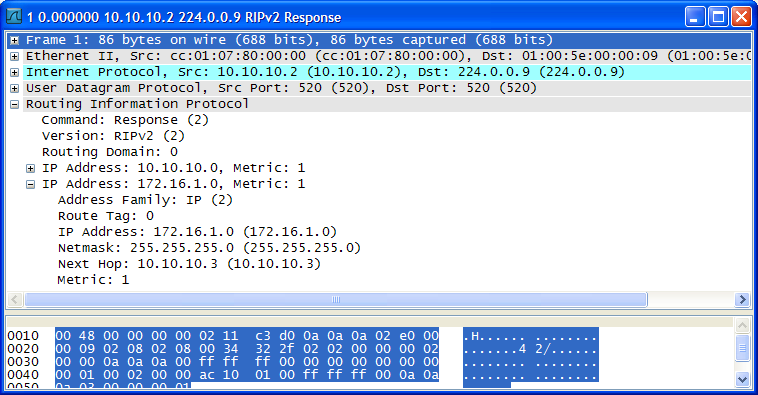
Below shows the RIPv2 update packet generated by RT2 and received on RT1.
Notice the next hop is RT3.
This is efficient. :-)


Now, let's see how OSPF works in this network setup.
RT1 Configuration:
!
router ospf 100
 log-adjacency-changes
 network 0.0.0.0 255.255.255.255 area 0
!

RT2 Configuration:

!
router ospf 100
 log-adjacency-changes
 redistribute static subnets
 network 0.0.0.0 255.255.255.255 area 0
!
ip route 172.16.1.0 255.255.255.0 10.10.10.3
!
================================================================================
RT1#debug ip ospf events
OSPF events debugging is on
RT1#
00:03:04: OSPF: Rcv LS UPD from 10.10.10.2 on FastEthernet0/0 length 64 LSA count 1
00:03:04: OSPF: Schedule partial SPF - type 5 id 172.16.1.0 adv rtr 10.10.10.2
00:03:04: OSPF: Service partial SPF 0/1/0
00:03:04: OSPF: Start partial processing Type 5 External LSA 172.16.1.0, mask 255.255.255.0, adv 10.10.10.2, age 1, seq 0x80000001, metric 20, metric-type 2
00:03:04:    Add path: next-hop 10.10.10.3, interface FastEthernet0/0
00:03:04:  network update dest_addr 172.16.1.0 mask 255.255.255.0 gateway 10.10.10.3
00:03:04:    Add External Route to 172.16.1.0. Metric: 20, Next Hop: 10.10.10.3
00:03:04: OSPF: insert route list LS ID 172.16.1.0, type 5, adv rtr 10.10.10.2
00:03:05: OSPF: Send hello to 224.0.0.5 area 0 on FastEthernet0/0 from 10.10.10.1
00:03:06: OSPF: Rcv hello from 10.10.10.2 area 0 from FastEthernet0/0 10.10.10.2
00:03:06: OSPF: End of hello processing
RT1#
RT1#sh ip route

Gateway of last resort is not set

     172.16.0.0/24 is subnetted, 1 subnets
O E2    172.16.1.0 [110/20] via 10.10.10.3, 00:00:10, FastEthernet0/0
     10.0.0.0/24 is subnetted, 1 subnets
C       10.10.10.0 is directly connected, FastEthernet0/0
RT1#
RT1#sh ip ospf database

            OSPF Router with ID (10.10.10.1) (Process ID 100)

                Router Link States (Area 0)

Link ID         ADV Router      Age         Seq#       Checksum Link count
10.10.10.1      10.10.10.1      79          0x80000002 0x00FBB8 1
10.10.10.2      10.10.10.2      79          0x80000003 0x00FDB0 1

                Net Link States (Area 0)

Link ID         ADV Router      Age         Seq#       Checksum
10.10.10.2      10.10.10.2      80          0x80000001 0x00A119

                Type-5 AS External Link States

Link ID         ADV Router      Age         Seq#       Checksum Tag
172.16.1.0      10.10.10.2      12          0x80000001 0x00EDB3 0
RT1#
RT1#sh ip ospf database external

            OSPF Router with ID (10.10.10.1) (Process ID 100)

                Type-5 AS External Link States

  Routing Bit Set on this LSA
  LS age: 43
  Options: (No TOS-capability, DC)
  LS Type: AS External Link
  Link State ID: 172.16.1.0 (External Network Number )
  Advertising Router: 10.10.10.2
  LS Seq Number: 80000001
  Checksum: 0xEDB3
  Length: 36
  Network Mask: /24
        Metric Type: 2 (Larger than any link state path)
        TOS: 0
        Metric: 20
        Forward Address: 10.10.10.3
        External Route Tag: 0

RT1#
RT1#debug ip icmp
ICMP packet debugging is on
RT1#
RT1#ping 172.16.1.1 repeat 1

Type escape sequence to abort.
Sending 1, 100-byte ICMP Echos to 172.16.1.1, timeout is 2 seconds:
!
Success rate is 100 percent (1/1), round-trip min/avg/max = 36/36/36 ms
RT1#
00:05:45: ICMP: echo reply rcvd, src 172.16.1.1, dst 10.10.10.1
RT1#

OSPF also works efficiently as like RIPv2.
OSPF utilizes the Forwarding Address field in the Type-5 AS-External LSA which is similar to the Next Hop field in the RIPv2 Update packets.
Below shows the OSPF LSU packet generated by RT2 to RT1 for the sake of completeness. :-)


Lastly, come back to our main focus on EIGRP... :-)
RT1 Configuration:
!
router eigrp 100
 network 10.0.0.0
 no auto-summary
!

RT2 Configuration:
!
router eigrp 100
 redistribute static
 network 10.0.0.0
 no auto-summary
!
ip route 172.16.1.0 255.255.255.0 10.10.10.3
!
================================================================================
RT1#debug ip eigrp
IP-EIGRP Route Events debugging is on
RT1#
00:05:40: IP-EIGRP(Default-IP-Routing-Table:100): Processing incoming UPDATE packet
00:05:40: IP-EIGRP(Default-IP-Routing-Table:100): Ext 172.16.1.0/24 M 30720 - 25600 5120 SM 28160 - 25600 2560
00:05:40: IP-EIGRP(Default-IP-Routing-Table:100): Ext 172.16.1.0/24 metric 30720 - 25600 5120
RT1#
RT1#sh ip route

Gateway of last resort is not set

     172.16.0.0/24 is subnetted, 1 subnets
D EX    172.16.1.0 [170/30720] via 10.10.10.2, 00:01:56, FastEthernet0/0
     10.0.0.0/24 is subnetted, 1 subnets
C       10.10.10.0 is directly connected, FastEthernet0/0
RT1#
RT1#sh ip eigrp neighbors
IP-EIGRP neighbors for process 100
H   Address                 Interface       Hold Uptime   SRTT   RTO  Q  Seq
                                            (sec)         (ms)       Cnt Num
0   10.10.10.2              Fa0/0             11 00:02:23 1396  5000  0  3
RT1#
RT1#sh ip eigrp topology
IP-EIGRP Topology Table for AS(100)/ID(10.10.10.1)

Codes: P - Passive, A - Active, U - Update, Q - Query, R - Reply,
       r - reply Status, s - sia Status

P 10.10.10.0/24, 1 successors, FD is 28160
        via Connected, FastEthernet0/0
P 172.16.1.0/24, 1 successors, FD is 30720
        via 10.10.10.2 (30720/28160), FastEthernet0/0
RT1#
RT1#sh ip eigrp topology 172.16.1.0/24
IP-EIGRP (AS 100): Topology entry for 172.16.1.0/24
  State is Passive, Query origin flag is 1, 1 Successor(s), FD is 30720
  Routing Descriptor Blocks:
  10.10.10.2 (FastEthernet0/0), from 10.10.10.2, Send flag is 0x0
      Composite metric is (30720/28160), Route is External
      Vector metric:
        Minimum bandwidth is 100000 Kbit
        Total delay is 200 microseconds
        Reliability is 255/255
        Load is 1/255
        Minimum MTU is 1500
        Hop count is 1
      External data:
        Originating router is 10.10.10.2
        AS number of route is 0
        External protocol is Static, external metric is 0
        Administrator tag is 0 (0x00000000)
RT1#
RT1#debug ip icmp
ICMP packet debugging is on
RT1#
RT1#ping 172.16.1.1 repeat 1

Type escape sequence to abort.
Sending 1, 100-byte ICMP Echos to 172.16.1.1, timeout is 2 seconds:
!
Success rate is 100 percent (1/1), round-trip min/avg/max = 92/92/92 ms
RT1#
00:06:47: ICMP: redirect rcvd from 10.10.10.2- for 172.16.1.1 use gw 10.10.10.3
00:06:47: ICMP: echo reply rcvd, src 172.16.1.1, dst 10.10.10.1
RT1#
RT1#ping 172.16.1.1 repeat 1

Type escape sequence to abort.
Sending 1, 100-byte ICMP Echos to 172.16.1.1, timeout is 2 seconds:
!
Success rate is 100 percent (1/1), round-trip min/avg/max = 36/36/36 ms
RT1#
00:06:50: ICMP: redirect rcvd from 10.10.10.2- for 172.16.1.1 use gw 10.10.10.3
00:06:50: ICMP: echo reply rcvd, src 172.16.1.1, dst 10.10.10.1
RT1#
RT1#sh ip redirects
Default gateway is not set

Host               Gateway           Last Use    Total Uses  Interface
ICMP redirect cache is empty
RT1#

hmm... the next hop is not RT3 as like RIPv2 and OSPF.
ICMP redirect packets were generated by RT2 every time as a packet originated from RT1 to 172.16.1.0/24.
The ICMP layer of RT2 is trying to solve the inefficiency problem in EIGRP, but RT1 is too stubborn to listen to the suggestion / recommendation by RT2. :-)

And let's examine the EIGRP update packet generated by RT2.


hey, what?!? 0.0.0.0!

This problem is still exists in recent IOS.
RT2#sh ver | in IOS|Compiled
Cisco IOS Software, 7200 Software (C7200-ADVENTERPRISEK9-M), Version 15.0(1)M5, RELEASE SOFTWARE (fc2)
Compiled Wed 23-Feb-11 18:55 by prod_rel_team
RT2#

Cisco DEs, DO SOMETHING and don't make people laugh!!!